Dividends
Purpose
The Dividends module is used to declare and distribute annual dividends to cooperative members. Dividends are payments made from the cooperative's profit — members receive a share of the profit proportional to their share capital. This page covers how to create a dividend declaration, view policies, and process payouts.
Who Can Access
| Role | Access Level |
|---|---|
| Administrator | Full access — can declare, edit, and process dividends |
| Committee Member | Can review and approve dividend declarations |
| Auditor | View-only |
| Member | Can view their dividend history on the portal |
How to Open This Page
Sidebar → Dividends
Dividends List
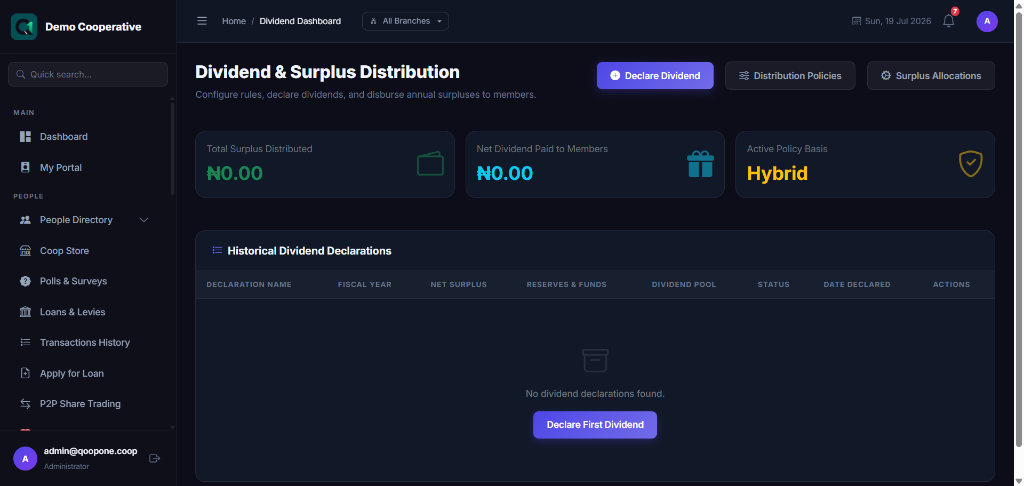
Shows all dividend declarations made by the cooperative.
| Column | Description |
|---|---|
| Period | Financial year or period for this dividend (e.g. 2025 Financial Year) |
| Total Amount | Total dividend pool declared |
| Per Share | Dividend amount per share unit |
| Status | Draft, Approved, Distributed |
| Declared On | Date the dividend was declared |
Surplus Policies
Sidebar → Dividends → Surplus Policies
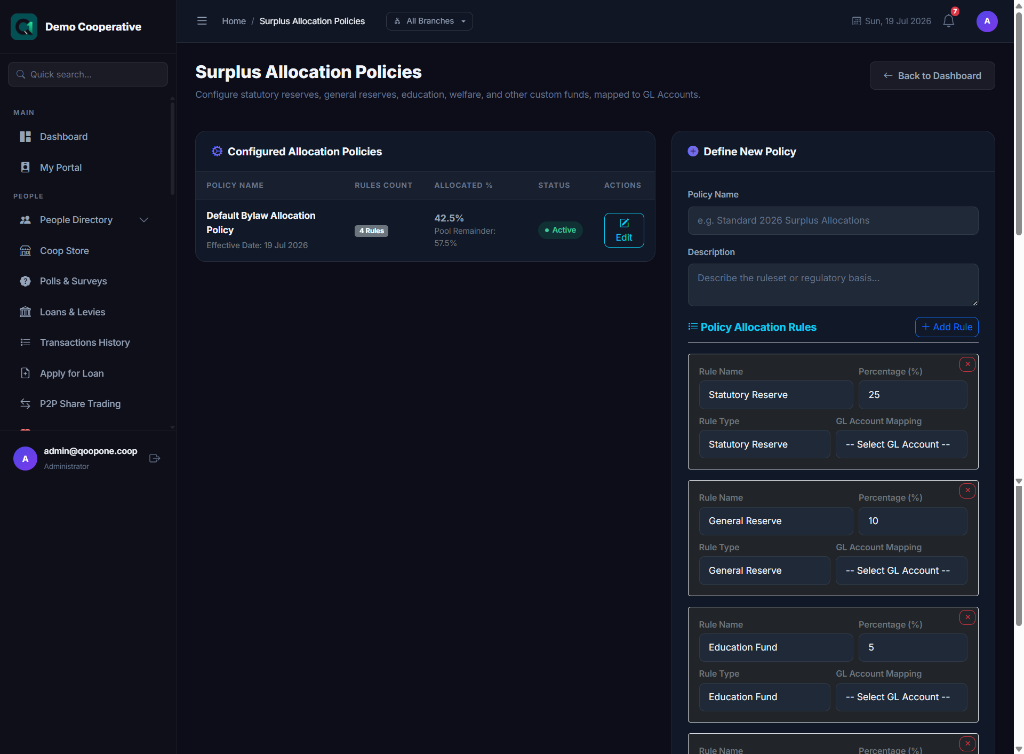
Surplus policies define how the cooperative's surplus (profit) is allocated before dividends are paid to members. Common allocations include:
- Reserve Fund
- Education Fund
- Dividend Pool
| Column | Description |
|---|---|
| Policy Name | Name of the allocation (e.g. Statutory Reserve) |
| Percentage | Portion of surplus allocated to this fund |
| Active | Whether this policy is currently in use |
Creating a Dividend Declaration
- Go to Dividends.
- Click Create Declaration.
- Fill in the form:
Field Guide
| Field | Required | Description | Example |
|---|---|---|---|
| Period / Year | Yes | The financial year this dividend covers | 2025 |
| Total Surplus | Yes | The cooperative's total profit for the year | ₦10,000,000 |
| Dividend Pool Amount | Yes | The portion of the surplus allocated to dividends (after deducting reserves) | ₦6,000,000 |
| Per Share Amount | Auto | Calculated by dividing the dividend pool by total shares | ₦200 per share |
| Declaration Date | Yes | The date the dividend was officially declared | 30/12/2025 |
| Payment Date | No | The date dividends will be paid to members | 31/01/2026 |
- Click Save to create the declaration as a Draft.
- Submit for approval if required.
Dividend Exception Report
Sidebar → Dividends → Exception Report
Shows members who could not receive dividends because of issues such as:
- Account is closed or suspended
- Member has exited the cooperative
- Member has outstanding loan deductions that exceed their dividend
Step-by-Step: Process Annual Dividends
- Close the financial period in Accounting → Period Management.
- Go to Dividends.
- Click Create Declaration.
- Enter the total surplus and dividend pool amount.
- Review the auto-calculated per-share amount.
- Save as Draft.
- Submit for approval.
- Once approved, click Distribute to credit each member's account.
- Print the Exception Report to handle any members who could not be paid.
Tips
Check the Surplus Policies First
Before declaring dividends, review the Surplus Policies page to make sure all fund allocations are correctly set up. The dividend pool is what remains after all deductions.
Approve Before Distributing
The declaration must be approved before you can distribute dividends. Distributing is irreversible — members' accounts will be credited.
Frequently Asked Questions
Q: How is the dividend per share calculated?
A: Total Dividend Pool ÷ Total Number of Shares Outstanding = Dividend per Share.
Q: Can a member receive dividends if they have an unpaid loan?
A: Depending on your cooperative's policy, the loan balance may be deducted from the dividend before payment.
Q: What happens to the dividend of a member who exited during the year?
A: This is handled in the Exception Report. The administrator can decide whether to pay a pro-rated amount or forfeit it.