Investment Pools
Purpose
Investment Pools allow the cooperative to create community investment campaigns where members can invest funds and receive returns. Think of it like a managed fund — the cooperative pools member contributions into a named campaign (e.g., "Cashew Processing Investment") and pays returns based on the campaign's estimated ROI.
Who Can Access
- Administrator
- Manager
- Account Officer (can view)
- Members (can invest via Member Portal)
How to Open This Page
Finance → Investments → Investment Pools
Screen Overview
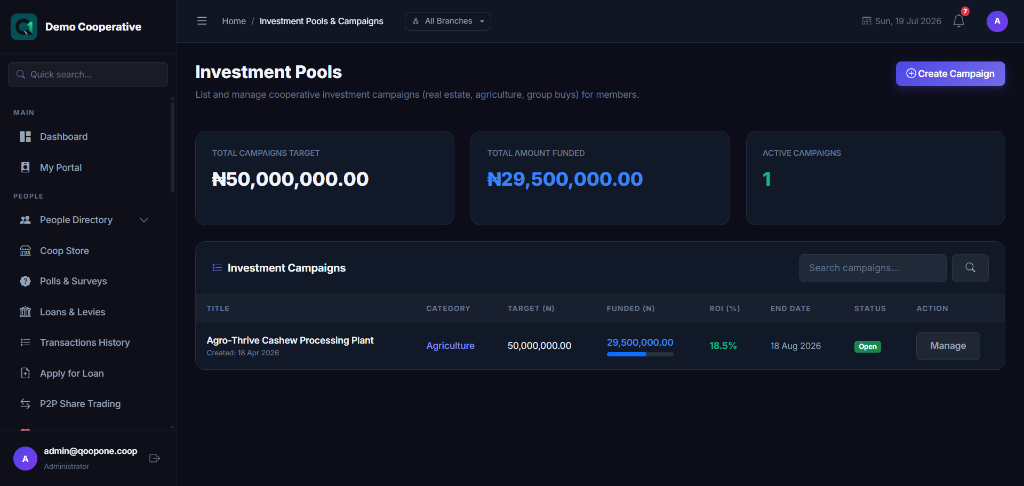
The Investment Pools page shows all active and completed investment campaigns with the campaign title, total raised, estimated ROI, close date, and status.
Key Concepts
| Term | Meaning |
|---|---|
| Campaign | A named investment opportunity (e.g., "Palm Oil Investment 2025") |
| Target Amount | The total funds the campaign aims to raise |
| Estimated ROI | Expected return on investment (% per annum) |
| Min Investment | Smallest amount a member can invest |
| Maturity Date | When the investment closes and returns are paid |
Creating an Investment Campaign
Step-by-Step Guide
- Go to Finance → Investments → Investment Pools.
- Click New Campaign.
- Enter the Campaign Title.
- Enter the Campaign Description — explain what the funds will be used for.
- Set the Target Amount (total to raise).
- Set the Minimum Investment Amount.
- Set the Estimated ROI (percentage return).
- Set the Open Date and Close Date.
- Upload a Campaign Image (optional but recommended for member portal).
- Click Save Campaign.
Field Guide
| Field | Required | Description | Example |
|---|---|---|---|
| Campaign Title | ✅ | Name of the investment | Cashew Processing 2025 |
| Description | ✅ | What the funds are used for | Processing cashew nuts for export |
| Target Amount | ✅ | Total funds to raise | ₦20,000,000 |
| Min Investment | ✅ | Smallest individual investment | ₦50,000 |
| Estimated ROI (%) | ✅ | Projected annual return | 15 |
| Open Date | ✅ | When members can start investing | 01 Mar 2025 |
| Close Date | ✅ | Last date for investments | 30 Apr 2025 |
| Maturity Date | ✅ | When returns are paid out | 01 Mar 2026 |
Recording a Member Investment
When a member invests in a campaign:
- Open the campaign.
- Click Record Investment.
- Select the Member.
- Enter the Amount.
- Click Save.
The system deducts the amount from the member's Regular Savings account.
Investment Certificates
Every member who invests in a campaign can download or print their Investment Certificate:
- Open the campaign detail page.
- Find the member in the investor list.
- Click View Certificate (📜).
The certificate shows the member's name, investment amount, campaign name, cooperative branding, and expected return.
Note
Members can also access their investment certificate from the Member Portal or the QoopOne Member App.
Table Columns
| Column | Description |
|---|---|
| Campaign | Name of the investment opportunity |
| Target Amount | Total funds the campaign aims to raise |
| Raised | Amount invested so far |
| Investors | Number of members who have invested |
| ROI | Estimated return percentage |
| Close Date | Last date to invest |
| Status | Open, Closed, Matured |
Tips
Tip
Write a clear and compelling campaign description. Members are more likely to invest when they understand exactly what their money is funding.
Tip
Set a realistic ROI. Overpromising returns damages trust when the campaign matures.
Common Mistakes
- Setting a target amount that is too high and leaving the campaign under-funded.
- Not communicating the maturity date clearly to investors.
Frequently Asked Questions
Q: Can a member invest in multiple campaigns at the same time?
A: Yes. Members can invest in as many open campaigns as they wish, subject to available balance.
Q: What happens if a campaign does not reach its target amount?
A: Depending on policy, the campaign may still proceed with the funds raised, or investments may be refunded.
Q: How are returns paid out at maturity?
A: Returns are credited to the investor's Regular Savings account on the maturity date, or processed via bank transfer.