Regular Savings
Purpose
The Regular Savings module allows staff to open and manage standard savings accounts for cooperative members. A Regular Savings account is a flexible account where members can deposit money at any time and withdraw when needed, subject to the cooperative's rules. Members earn interest on the balance held in the account.
Who Can Access
| Role | Access Level |
|---|---|
| Administrator | Full access — open accounts, post transactions, approve withdrawals |
| Committee Member | Can open accounts and approve withdrawals |
| Account Officer | Can open accounts and post deposits |
| Teller | Can post deposits and withdrawals |
| Auditor | View-only |
| Member | Can view their own account balance and history on the portal |
How to Open This Page
Sidebar → Savings
Savings Account List
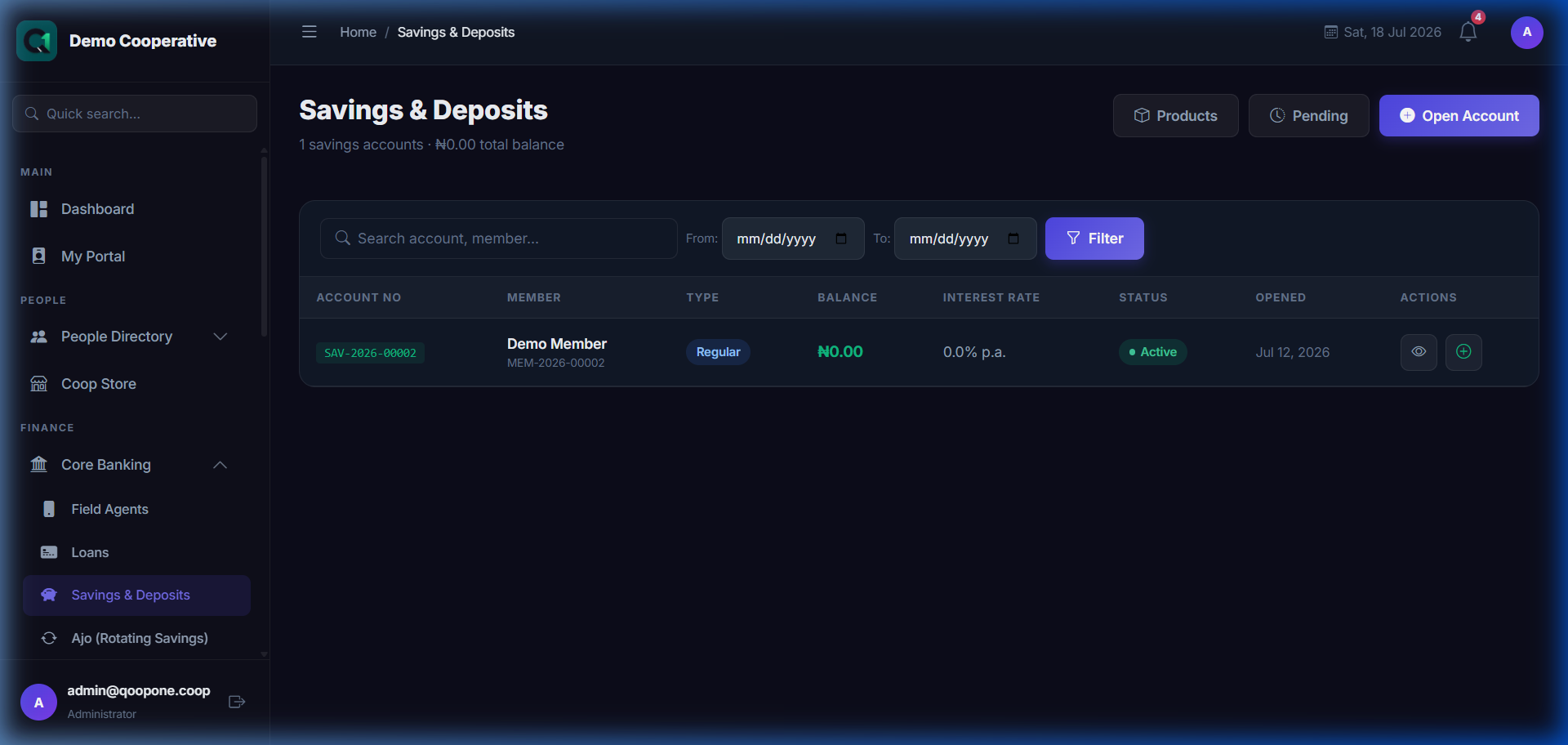
👉 HOW TO WORK WITH SAVINGS ACCOUNTS (Vivid Guide)
- View savings list: Go to Core Banking -> Savings & Deposits.
- Add/Deposit money: Open the member's profile or account details page, click "Deposit", enter the amount, and click save.
- Approve withdrawal: If a member requested a withdrawal, go to Core Banking -> Savings & Deposits -> click the "Pending" tab at the top, select the request, and click "Approve".
The list shows all savings accounts in the cooperative, across all product types.
Filters
| Filter | Description |
|---|---|
| Search | Search by member name, account number, or member ID |
| Status | Active, Closed, Suspended |
| Product Type | Regular, Target, Fixed Deposit, Recurring |
Table Columns
| Column | Description |
|---|---|
| Account No | Unique account number generated by the system |
| Member | Name and member number of the account holder |
| Product | Savings product type (e.g. Regular Savings) |
| Balance | Current balance in the account |
| Status | Active or Closed |
| Opened On | Date the account was opened |
| Actions | 👁 View details |
Opening a Regular Savings Account
Sidebar → Savings → Open Account (+ button)
Field Guide
| Field | Required | Description | Example |
|---|---|---|---|
| Member | Yes | Search and select the member who will own this account. Only active, approved members can be selected. | Adaeze Okonkwo (MBR-0001) |
| Savings Product | Yes | Choose a savings product. Select a Regular Savings product from the dropdown. The system will show only applicable products for this member. | Standard Savings |
| Account Name | No | A friendly label for this account. Leave blank to use the product name. | Emergency Fund |
When you select a product, the system automatically shows:
- Product Type (Regular, Target, Fixed Deposit, Recurring)
- Interest Rate (annual percentage)
- Minimum Deposit required
- Early Withdrawal Penalty (if any)
Buttons
| Button | What It Does |
|---|---|
| Open Account | Creates the account. The button activates only after all required fields are filled. |
| Cancel | Discards the form and returns to the Savings list |
Step-by-Step: Open a Regular Savings Account
- Go to Savings in the sidebar.
- Click Open Account (or the + button).
- Select the Member from the dropdown. Type to search by name or member number.
- Select Savings Product — choose a Regular Savings product.
- Optionally enter an Account Name.
- Review the product details shown on the right (interest rate, minimum balance, etc.).
- Click Open Account.
- The system creates the account and generates a unique account number automatically.
Account Details Page
Click 👁 View on any account to open its details.
The details page shows:
- Account summary — member name, account number, product, balance, interest earned
- Transactions — full history of deposits, withdrawals, and interest credits
- Action buttons — Deposit, Withdraw, Transfer, Close Account
Posting a Deposit
- Open the account details page.
- Click Deposit (or Credit Account).
- Enter the Amount.
- Select the Payment Method (Cash, Bank Transfer, etc.).
- Enter a Reference or Description (optional).
- Click Save.
Posting a Withdrawal
- Open the account details page.
- Click Withdraw (or Debit Account).
- Enter the Amount to withdraw.
- Select the reason or type.
- Click Save.
Withdrawal Rules
The system enforces any minimum balance rules set in the savings product. If the withdrawal would take the balance below the minimum, it will be blocked.
Pending Withdrawals
Sidebar → Savings → Pending Withdrawals
This page shows withdrawal requests that require approval before they can be processed.
| Column | Description |
|---|---|
| Member | Who is requesting the withdrawal |
| Account | Which account the withdrawal is from |
| Amount | How much they want to withdraw |
| Requested On | Date the request was submitted |
| Status | Pending / Approved / Rejected |
Approving a Withdrawal
- Click View on the pending withdrawal.
- Review the details.
- Click Approve or Reject.
Tips
One Regular Account Per Member
By default, each member can only have one Regular Savings account. The system will hide the Regular Savings product option if the member already has one.
Interest Calculation
Interest is calculated on the account balance and credited automatically at the end of each period (usually monthly). You do not need to do this manually.
Common Mistakes
| Mistake | How to Avoid |
|---|---|
| Trying to open a Regular account for a member who already has one | The Regular product will be hidden in the dropdown |
| Withdrawing more than the available balance | The system will show an error and prevent the withdrawal |
| Opening an account for a Pending/unapproved member | Only approved, active members can open accounts |
Frequently Asked Questions
Q: Can a member have more than one Regular Savings account?
A: No. Each member is limited to one Regular Savings account.
Q: How does the system calculate interest?
A: Interest is calculated based on the interest rate set in the savings product and the account's average daily balance. It is credited automatically at the end of each period.
Q: What happens when I close an account?
A: The balance must be zero before an account can be closed. All outstanding interest will be paid first.